|
Password Recovery Solutions | |
| Home | Download | Order | Contact us | About |
|
|
MS Access (2003 and earlier) has tangled but unsafe security model. It is quite difficult to understand it, but it is possible to recover any password instantly. To recover Access 2007 passwords, you have to use the universal password recovery methods, such as Brute Force Attack. This may take a long time if the password is long. We receive a lot of questions concerning Access password recovery. This article is addressed to those users who are unfamiliar with MS Access security model. There are two different password types in MS Access: database passwords (Access 95 and later) and user passwords (Access 2003 and earlier, there are no user passwords in Access 2007). Unlike most competitive products, Access Password can recover both password types (Pro version is required to recover user passwords). Let's consider both password types in detail.
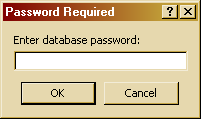
Database passwords (sometimes referred to share-level passwords) were introduced in Access 95. There are no Database passwords in Access 2.0.If the Database password is enabled, the following dialog box appears every time you open the database.
Note that we use Access 2000 to take screenshots for this article. In other versions dialog boxes can have a little different look. As you can see password only asked. There is no a prompt for the user's
name because the database password is the same for all users.
Database password is stored in the database. Although the password is encrypted, it can be extracted and decrypted instantly if the database is in the Access 2003 or older format. The recovery of an Access 2007 database password requires a Brute Force Attack. That means that the password recovery may take a lot of time if the password is long enough. Please read this article for further details. Note that if database header is broken, MS Access may erroneously treat the database as the password protected one. Access Password can detect broken databases. We can try to recover your broken database manually. Email us for a price quote. Please specify in the email size of your database.
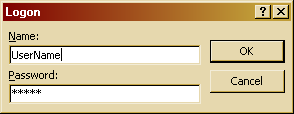
User passwords are presented in all MS Access versions, this is the basic security mechanism in Access. In a user-level security system, users are authenticated when they start Microsoft Access by logging on with a password. Both user's name and passwords are required. Different users can have different permissions on the same objects. Permissions may be granted to a single user or to users group. Group information and users' passwords are stored in a special system database. One system database could be shared between different databases and applications. User passwords are available in the old Access versions only (2003 and earlier). In MS Access 2007, the security model has been redesigned; database security has been improved, and user passwords have been removed at all. User password (if enabled) is asked at Access startup. Note that in contrast to a Database password, user's name is being asked along with password. Password prompt dialog looks like this:
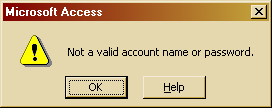
If password is entered the following message box will appear:
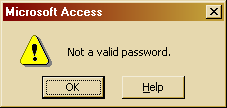
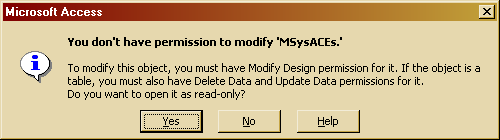
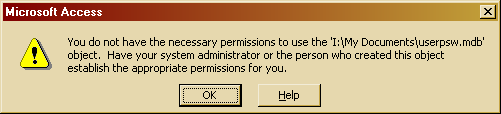
It is very important to realize that user passwords are NOT stored in the database. They are stored in a so-called system database. Normally system database has .mda file type in Access 2.0 and .mdw in newer versions. Unfortunately .mda file type is also used for MS Access add-ins, so file with .mda files type may be or may not be a system database. System database is required to recover users' passwords groups membership information. If the system database is lost or broken you can't recover users' password. Future version of Access Password will be able to regain access to a database without system database. You can use Tools -> Security -> Workgroup administrator menu command in MS Access to create new system database or to select which system database you would like to use by default. Note that there is no such menu command in older Access versions; use standalone wrkgadm.exe utility to do this. Often password problems appear when wrong system database is selected. In this case you may be unable to view or to edit some tables. Sometimes you may be unable even to open the database. You may receive various errors, most common are shown on the following screenshots:
In this case you should locate correct system database and join it using workgroup administrator menu command.
|
|
Home /// Download /// Order /// Terms of Use /// Privacy Policy Copyright © 1997-2024 LastBit.com All rights reserved. |